The Anatomy of a High-Converting Homepage
Most service business homepages bury the lead. Here's what a high-converting homepage actually looks like, section by section, and why each part matters.
Your homepage gets one shot. A visitor lands, scans for about five seconds, and either decides to stay or leaves. Most service business homepages fail that test because they were built around what the owner wants to say, not around what the visitor needs to know.
A high-converting homepage is not the one with the most impressive design. It is the one that answers the right questions, in the right order, quickly enough that the visitor does not give up before they get there. This post walks through each section of a homepage that actually works, explains why it is structured that way, and gives you a clear picture of what yours might be missing.
What is the job of a homepage?
Before looking at individual sections, it helps to understand what a homepage is for. It is not a brochure. It is not a portfolio. It is a decision-support tool for someone who does not yet know if you are the right fit for them.
The visitor is asking four questions, usually in under 10 seconds:
- What do you do?
- Is it for someone like me?
- Can I trust you?
- What should I do next?
A homepage that answers all four, clearly and in that order, converts. One that tries to do something else, tell a brand story, showcase an award, explain your philosophy before the reader knows what you sell, loses the visitor before they get to the parts that matter.
Above the fold: the first 5 seconds
“Above the fold” means whatever appears on the screen before a visitor scrolls. On a typical laptop, that is a strip of content roughly 600 to 700 pixels tall. On mobile, it is even less.
This real estate decides whether anyone reads the rest of the page. It needs to answer the first two questions immediately: what you do, and whether it is relevant to this visitor.
A high-converting above-the-fold section has three parts:
- A headline that names the outcome, not the service. “Get more leads from your website” converts better than “Professional Web Design Services.” The visitor does not care about the service; they care about the result. Write the headline around what they want to achieve, not what you technically provide.
- A subheadline that adds specificity. One sentence that fills in who this is for and how it works. “We build fast, conversion-focused websites for Alberta service businesses” takes 30 words and gives the visitor enough to know whether to keep reading.
- A single, clear primary call to action. One button. Not three options, not a form, not a phone number and a button and a link. One next step that tells the visitor what happens when they click it. “Get a free quote” or “See our work” are honest and direct. “Learn more” is not a call to action; it is a placeholder.
The biggest mistake service businesses make above the fold is trying to say everything at once. The goal of this section is not to close the sale. It is to earn the scroll.
Social proof: establish trust early
After a visitor understands what you do, the next thing they want to know is whether to believe you. The section immediately below the hero is the right place to establish that.
Social proof takes different forms depending on what you have available:
- Client logos or recognisable business names signal that real companies have trusted you.
- A short testimonial with a name and business type is more credible than a paragraph of claims you made about yourself.
- A specific result or outcome (“Our clients report more qualified enquiries within 90 days”) is more persuasive than a general promise, but only if it is a true, verifiable observation from real client experiences.
The position matters as much as the content. Proof placed near the top of the page works harder than the same proof placed at the bottom, because it reaches the visitors who are still deciding whether to keep reading. Most people never make it to the bottom.
What you do: the services overview
By this point, the visitor knows you are worth their attention. Now they want to understand what you actually offer.
This section does not need to be long. Two or three short descriptions, each focused on the outcome rather than the feature list, and each linked to the corresponding service page. The goal is orientation, not information overload.
“We build websites that rank in local search and turn visitors into enquiries” is more useful than a bulleted list of deliverables. The visitor is not buying a list of features; they are buying a result. Write this section accordingly.
Keep it skimmable. A service business owner scanning your homepage at 9pm between client jobs is not going to read dense paragraphs. Short headlines, a sentence of context, and a link to learn more is the right level of detail for this position on the page.
Proof of work: show, do not tell
After describing what you do, demonstrate that you have actually done it. A work or portfolio section with two to three real examples is significantly more persuasive than any claim you can make about your approach.
The specifics of how you display this depend on your portfolio. What matters is that each example gives the visitor enough context to see themselves in it. Showing a before-and-after, naming the business type, or noting a specific outcome all help the visitor mentally map your work onto their own situation.
For a service business like a paving contractor or an auto shop, seeing another similar local business treated well is a genuine conversion moment. It answers the unspoken question: “Have you done this for someone like me?”
Internal links to individual work pages here serve double duty. They give the engaged visitor somewhere to go for more detail, and they distribute page authority toward the portfolio entries that build credibility.
The process: reduce uncertainty
One of the main reasons service business visitors do not convert is uncertainty about what happens next. They are not sure what “getting a quote” actually involves, or how long the process takes, or whether they will end up in a long sales cycle they did not ask for.
A brief process section, three to four steps, removes that friction. It does not need to be elaborate. “We talk through what you need. We build and test. You launch with support.” That level of simplicity is enough to make the next step feel manageable.
What this section is really doing is lowering the perceived cost of clicking the CTA. If a visitor is unsure what they are committing to, they will not commit to anything. Making the next step feel small and low-risk directly increases conversions.
Trust signals: the quieter credibility layer
Beyond direct social proof (testimonials, client names), a homepage benefits from signals that build ambient trust without requiring the visitor to read anything carefully.
These include:
- A local address or service area. For a Canadian service business, knowing you are local and accessible matters. A Calgary address next to your phone number is a trust signal even for visitors who will never visit in person.
- A real phone number. Listing a genuine, clickable phone number signals that a real person exists and can be reached. Businesses that are hard to contact raise quiet doubts.
- Years of experience or a specific number of projects completed, if that number is accurate and means something. “Over 40 websites built for Alberta service businesses” is more credible than “years of experience.”
None of these signals convert visitors on their own. Together, they lower the reader’s background level of suspicion so the actual CTA lands better.
The contact section and final call to action
Every high-converting homepage ends with a clear, low-friction path to get in touch. By the time a visitor has reached the bottom of your page, they have already done the research. The only thing that remains is to make the next step obvious.
A strong closing call to action restates the core offer and names the first step plainly. “Ready to get more leads from your website? Request a free quote and we’ll get back to you within one business day.” That sentence does three things: it names the outcome the visitor wants, it names a specific next action, and it removes a common concern about response time.
The form itself matters too. A contact form that asks for nine pieces of information before the visitor has decided to hire you is a conversion killer. Name, email, and a brief description of what they need is enough to start a conversation. You can get the rest later.
How do these homepage sections work together?
Each section of a high-converting homepage answers one of the four questions from the beginning of this post, in order. The hero earns trust enough to scroll. Social proof answers “can I trust you.” The services and work sections answer “is this for me.” The process and trust signals reduce friction. The final CTA makes the next step easy.
Homepage structure is one piece of a larger conversion picture. For a broader view of CRO and all the factors that determine whether visitors contact you, see our complete guide to conversion rate optimization for service businesses.
Removing any one of these sections creates a gap. A homepage with a strong hero but no proof asks the visitor to take your word for it. A homepage with great portfolio work but no clear CTA gives the visitor nowhere to go once they are convinced.
The structure is not arbitrary. It follows the order of decisions a cautious buyer makes, because that is exactly who is reading it.
What should you check on your own homepage?
If you want to audit what you have now, these are the questions worth asking:
- Does the headline describe an outcome or a service? Outcomes convert; feature lists do not.
- Is there social proof above the scroll? Proof at the bottom of the page does not help visitors who leave in the first ten seconds.
- Is there one clear primary CTA? Multiple competing actions reduce conversions. Pick one.
- Is the process explained somewhere? If the visitor does not know what “get a quote” means, they will not click it.
- Is the contact path short? Count the fields in your contact form. Every unnecessary field costs you enquiries.
For most service business websites, the issue is not design. The layout, the colours, the fonts are fine. What is missing is a clear structure that moves the visitor from “I just arrived” to “I know what to do next.” That is a content and strategy problem, and it is fixable.
If you want a professional eye on how your homepage is performing and where it is losing conversions, the conversion optimisation service is built exactly for that.
For a broader look at why visitors leave without converting, the post on why your website gets traffic but no leads covers the most common root causes.
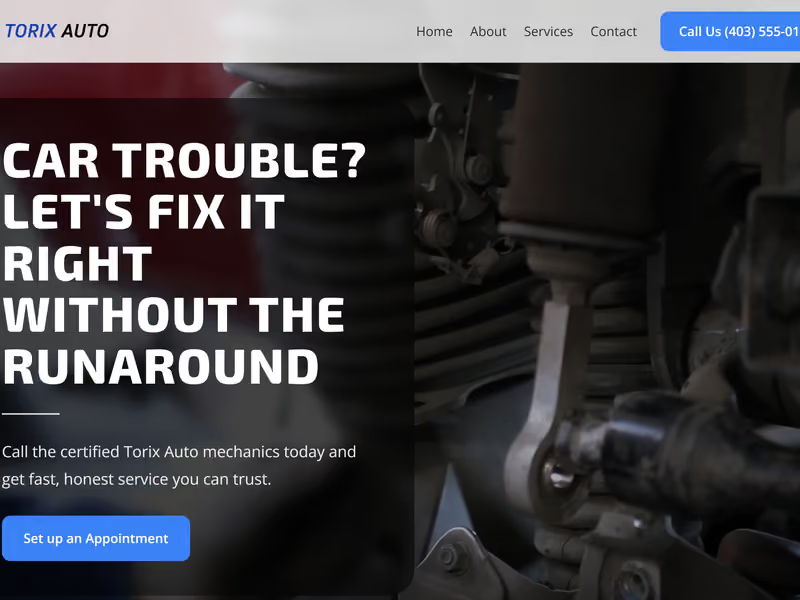
If you’d like to see how this structure translates into a real finished site for an Alberta service business, take a look at our work with Grador Paving and Torix Auto.