Web Design Mistakes That Cost Service Businesses Leads
Most service business websites lose leads before visitors even read a word. Here are the web design mistakes that kill conversions and what to do instead.

Your website is up. It looks decent enough. Maybe you paid someone to build it a few years ago, or pieced it together with a builder tool on a weekend. Either way, it exists, and it shows up when someone Googles your business name.
The problem is that showing up is not the same as converting. A lot of service business websites get visitors and quietly lose them, not because the business is unimpressive, but because the site itself creates friction at every step a visitor needs to take to become a lead.
These are not random failures. They are specific, repeatable mistakes, and most of them have practical fixes.
What is the real cost of a website that doesn’t convert leads?
Before getting into the mistakes themselves, it’s worth naming the actual cost.
If your site gets 200 visitors a month and converts 1% of them into contact form submissions, that’s 2 leads. A site that converts at 3% gives you 6. That difference does not come from tripling your ad spend or ranking for more keywords. It comes from fixing the friction that is already causing visitors to leave.
On a service-business website, most of the friction is design and structure problems, not content problems. The words might be fine. The calls to action might be buried, unclear, or completely absent.
Mistake 1: No Clear Primary Call to Action
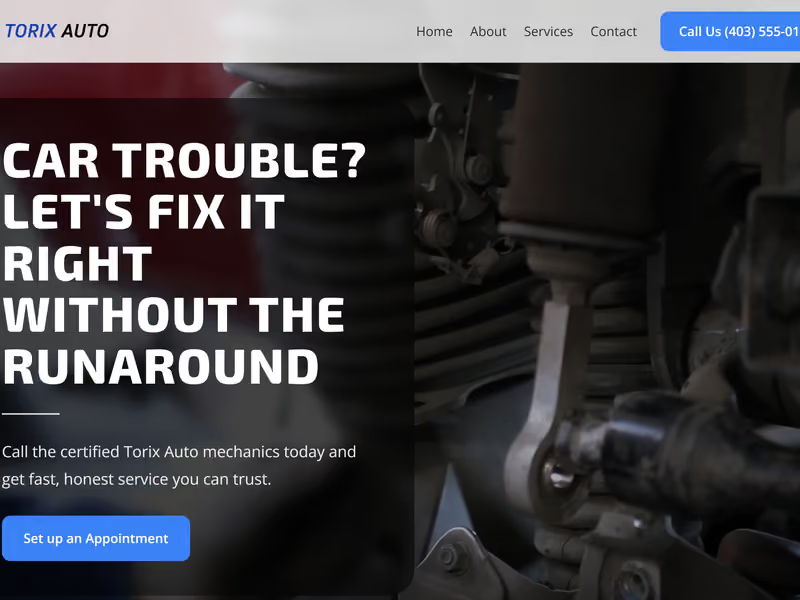
The most common problem on service business websites is that they do not tell visitors what to do next. There are links in the navigation, maybe a phone number in the header, and a contact page buried in a dropdown. But nothing on the homepage that says clearly: here is what you should do if you want to hire us.
A primary call to action (CTA) is a single, prominent, specific prompt. “Request a Free Quote,” “Book a Service Call,” “Get a Free Estimate.” It should appear above the fold (the part of the page visible before scrolling), and it should reappear at logical points as the visitor reads down the page.
Most visitors will not hunt for your contact information. If the next step isn’t obvious, they leave and call someone whose site made it easy.
Mistake 2: A Headline That Describes You Instead of the Outcome
The headline at the top of your homepage is the first thing a visitor reads. It has about three seconds to keep them on the page.
A lot of service business sites use that space to introduce themselves: “Calgary’s Premier HVAC Company Since 2003” or “Your Trusted Local Plumber.” These are statements about you. What a potential customer is actually thinking when they land on your site is: “Can this business solve my problem?”
A stronger headline names the outcome they want. “Fast, Reliable HVAC Service for Calgary Homes” answers their question immediately. It puts the reader first and gives the business one sentence to make the case. The company’s history and credibility can come right after that, once the visitor has decided to keep reading.
Mistake 3: Slow Load Times, Especially on Mobile
Page speed is the web design problem most business owners don’t think of as a design problem. But load time is one of the first decisions a visitor makes about your website, even if they make it unconsciously.
Google’s research on mobile pages shows a clear pattern: as load time increases, so does the percentage of visitors who leave before the page fully loads. On a service business site, that’s a lead that never saw your phone number.
The most common causes of slow sites are unoptimized images (photos uploaded at full size without compression), too many third-party scripts running on every page, and cheap hosting that can’t deliver files quickly. None of these require a full rebuild to fix, but they do require someone to actually address them.
A fast site is not a luxury feature. It is a baseline expectation, especially from mobile users who are often searching for a service provider while they’re already in the middle of a problem.
Mistake 4: Contact Information That’s Hard to Find
This one sounds too obvious to be a real problem, but it is remarkably common. Visitors who are ready to call or email should not have to work for it.
The pattern that loses the most leads: a contact page that’s one level deep in the navigation, a phone number only in the footer, and no clickable tel: link on mobile. A visitor on their phone who wants to call you has to copy and paste your number instead of tapping it. Many won’t bother.
Your phone number should be visible and clickable in the header on every page. Your email or contact form should be reachable in one click from anywhere on the site. If someone has decided they want to contact you, the website’s job is to get out of their way.
Mistake 5: No Social Proof Where Decisions Get Made
Trust is the thing a visitor is actually evaluating when they read your website. They’re asking: “Is this business going to do a good job? Have other people had a good experience here?”
Most service business sites either have no reviews or testimonials at all, or they have a dedicated “Testimonials” page that no one visits. The mistake is treating social proof as its own section rather than as a supporting element that appears throughout the site.
A well-placed testimonial on the homepage, near a call to action, does more than a testimonials page with twenty entries that requires a deliberate visit. One specific quote from a real customer (“They fixed our furnace same-day and didn’t leave a mess”) placed near a “Book a Service Call” button reinforces the decision a visitor is almost ready to make.
The same applies to logos of associations or certifications, local business badges, or the number of years you’ve been operating. These are trust signals, and they’re most useful when they appear next to the moment you’re asking a visitor to act.
Mistake 6: Mobile Layout That Wasn’t Really Designed
A site that was designed primarily on a desktop often looks fine on desktop and becomes a broken experience on a phone. Buttons that are too small to tap, text that overflows the screen, images that don’t scale, a navigation menu that partially works.
More than half of local service searches happen on mobile. A visitor searching for an electrician in their city is almost certainly on their phone. If they land on your site and it’s hard to read or the contact button doesn’t work properly, you’ve already lost them to the next result.
Responsive design is the term for building a site that adjusts its layout for different screen sizes. It’s a standard expectation now, not a premium feature. But a lot of older sites and template-built sites only partially achieve it, and those gaps are costing real inquiries.
Mistake 7: Too Many Options, Too Little Focus
The idea that more information is better does not hold on a website. A homepage that tries to explain every service, every credential, every client type, and every scenario a visitor might be in ends up explaining nothing.
When a visitor arrives on your site, they’re making a series of small decisions: “Is this relevant to me? Can they do what I need? Should I keep reading or go back?” Every extra option on the page slightly increases the time it takes to make those decisions. At some point, the easiest decision becomes leaving.
This is sometimes called “choice overload” in the design world. The practical fix is not minimalism for its own sake. It’s clarity about who the site is for and what it’s asking them to do. A homepage that does three things well (communicates what you do, shows proof that you do it well, and makes it easy to get in touch) converts better than one trying to cover every possibility.
Mistake 8: Forgetting That Search Engines and Real People Both Need Clear Structure
There is a temptation, particularly with template sites and page builders, to use design elements as headings. Big bold text styled to look like a section title, but not actually marked up as a heading. An image with text overlaid instead of a real content section.
This matters for two reasons. Search engines use heading structure to understand what a page is about, and poorly structured pages are harder to index well. But the more immediate problem is that real visitors who are scanning your page (and everyone scans before they read) lose the visual map that headings provide. Without a clear structure, long pages feel overwhelming even when the content itself is good.
Proper heading structure takes five minutes to audit and can make a measurable difference to both how Google reads the page and how quickly a visitor can find what they’re looking for.
What to Do If Your Site Has Several of These Problems
Reading a list like this can feel like being handed a long to-do list with no clear starting point. The practical approach is to prioritize by impact.
Start with the problems that affect every visitor: slow load times, missing or unclear CTAs, and contact information that’s hard to find. These affect every person who arrives on your site, regardless of how they found it or what they’re looking for.
Then work on mobile experience, because mobile visitors are a large and growing share of service business traffic. Then look at trust signals and page structure, which are high-impact but can be added incrementally.
If the site is more than four or five years old, or was built with a page builder and has accumulated a mix of all of the above, a full review is usually more efficient than patching individual problems. Our web design services for service businesses are built specifically around conversion and performance, not just aesthetics.
If you’re not sure which of these problems your site has, request a free website audit for a clear written breakdown of what’s affecting your site’s conversion. For a more in-depth engagement, our conversion optimization service identifies exactly where visitors are dropping off. The FAQ page also covers common questions about timelines, process, and what a redesign actually involves.
Frequently Asked Questions
How do I know if my website has a conversion problem?
The clearest signal is a gap between the traffic your site gets and the number of leads it produces. If you’re getting a reasonable number of visitors each month but very few contact form submissions or phone calls, the site has friction somewhere. Low traffic is a different problem; it means the site needs to be found more. A conversion problem means people are finding it but leaving without acting.
Can I fix these problems myself, or do I need a developer?
Several of these are DIY-friendly. Adding a phone number to your header, simplifying your homepage headline, and making sure your contact link is visible are things most business owners can change themselves if they have access to their site’s editor. Load time, mobile layout issues, and heading structure usually need someone technical to fix properly, especially on older sites where the problems are baked into the template.
Is a website redesign worth it if my site already gets some leads?
It depends on the gap between what the site is doing and what it could be doing. A site that converts 1% of visitors and could convert 3% is leaving a significant number of leads on the table every month. Whether the cost of a redesign is justified depends on the value of those leads and how quickly the improvement would pay for the investment. For most service businesses with consistent traffic, the math works out quickly.
Does website design actually affect search rankings?
Indirectly, yes. Page speed is a direct ranking factor, and Google’s Core Web Vitals (a measure of loading, interactivity, and visual stability) are part of how pages are evaluated. Beyond speed, high bounce rates (visitors leaving immediately) can signal to search engines that a page isn’t answering the query well. A site that keeps visitors engaged because it’s clear and useful tends to perform better over time than one that sends them back to search results.